
电商商品需求预测:时间序列入门案例
适合小白的完整实战分享:从原始订单表到可落地的需求预测。
这个案例要做什么?
我们手里有一家英国电商的历史订单数据(Online Retail II),时间跨度大约是 2009-12 到 2011-12。
业务问题很直接:
根据过去每天卖出了多少件商品,预测未来一段时间的总需求量。
有了需求预测,库存、采购、仓储人力安排都会更有依据。
我们会跟着这条主线走
- 明确预测目标:预测什么?按天还是按周?
- 整理时间字段:把订单变成真正的时间序列
- 处理数据问题:退货、缺失、异常值
- 观察数据规律:趋势、季节性、噪声
- 划分训练/测试集:用“过去”训练,用“未来”检验
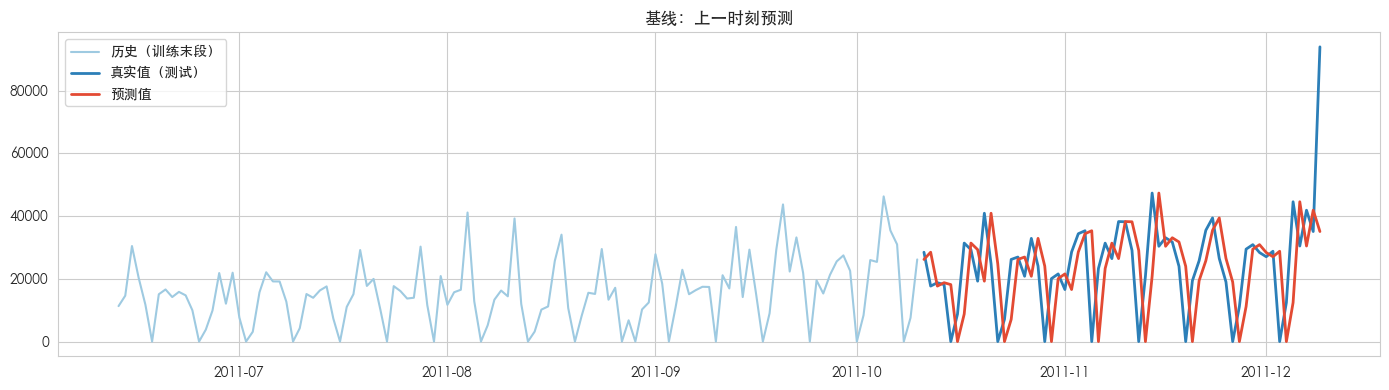
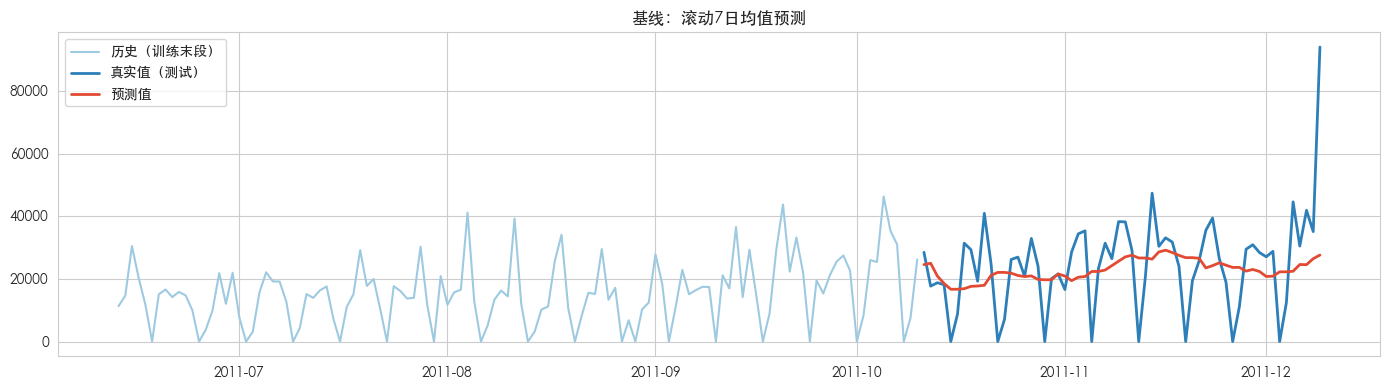
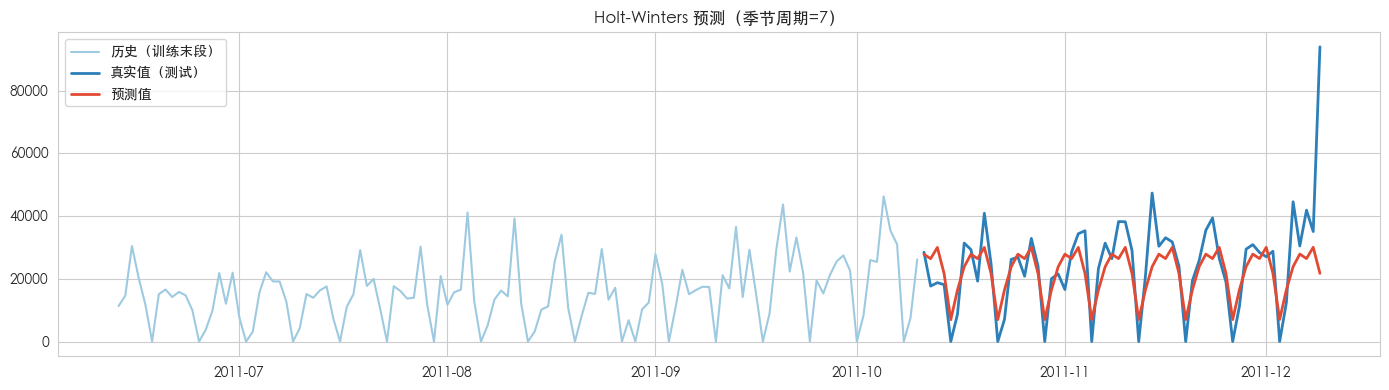
- 训练并预测:基线 → 指数平滑 → ARIMA → 随机森林
- 评估和比较:MAE / RMSE / MAPE
记住一句话:先理解数据,再选择模型;先验证简单方法,再增加复杂度。
0. 环境准备
请先安装依赖(在本案例目录下执行):
pip install -r requirements.txt然后用 Jupyter 打开本 notebook。
# 基础库
import warnings
warnings.filterwarnings('ignore')

import numpy as np
import pandas as pd
import matplotlib.pyplot as plt
import seaborn as sns

from pathlib import Path

# 统计模型
from statsmodels.tsa.seasonal import seasonal_decompose
from statsmodels.tsa.holtwinters import ExponentialSmoothing
from statsmodels.tsa.arima.model import ARIMA
from statsmodels.graphics.tsaplots import plot_acf, plot_pacf

# 机器学习
from sklearn.ensemble import RandomForestRegressor
from sklearn.metrics import mean_absolute_error, mean_squared_error
from IPython.display import display

# 图表风格:中文友好 + 清晰可读
plt.rcParams['font.sans-serif'] = ['Arial Unicode MS', 'PingFang SC', 'SimHei', 'DejaVu Sans']
plt.rcParams['axes.unicode_minus'] = False
plt.rcParams['figure.figsize'] = (12, 4)
sns.set_style('whitegrid')

# 1. 设置中文字体(这里列出了 Windows、Mac 和 Linux 的常见中文字体,系统会自动按顺序匹配)
plt.rcParams['font.sans-serif'] = ['SimHei', 'Microsoft YaHei', 'STHeiti', 'Heiti TC', 'sans-serif']

# 2. 正常显示负号
plt.rcParams['axes.unicode_minus'] = False

print('环境准备完成 ✅')
环境准备完成 ✅
1. 明确预测目标
| 项目 | 本案例设定 | 为什么这样设 |
|---|---|---|
| 预测对象 | 全站日销量(件数) | 最直观的“需求量” |
| 时间频率 | 按天 | 便于观察周内规律(周一到周日) |
| 预测长度 | 未来约 60 天 | 用最后 60 天当测试集,模拟真实业务 |
| 业务用途 | 库存补货 / 运营排班 | 预测偏一点可以接受,但不能乱猜 |
小白提示:时间序列预测不是“算出一个绝对正确的数字”,而是尽量接近真实值,帮助做更好的决策。
2. 读取原始数据
原始文件 online_retail_II.xlsx 有两个工作表:
Year 2009-2010Year 2010-2011
每一行是一条订单明细(某张发票里买了某个商品多少件),还不是时间序列。
我们后面会把它按天汇总成“每天卖了多少件”。
第一次读 Excel 可能需要 30~60 秒,属于正常现象。
如果你已经跑过后面生成 daily_demand.csv 的单元格,也可以直接从 CSV 快速加载。
DATA_DIR = Path('.')
XLSX_PATH = DATA_DIR / 'online_retail_II.xlsx'
CSV_PATH = DATA_DIR / 'daily_demand.csv'

# 优先读原始 Excel,保证演示完整流程
print('正在读取 Excel,请稍候...')
df_2009 = pd.read_excel(XLSX_PATH, sheet_name='Year 2009-2010')
df_2010 = pd.read_excel(XLSX_PATH, sheet_name='Year 2010-2011')

raw = pd.concat([df_2009, df_2010], ignore_index=True)
print('合并后原始行数:', len(raw))
print('字段:', list(raw.columns))
raw.head()
正在读取 Excel,请稍候...
合并后原始行数: 1067371
字段: ['Invoice', 'StockCode', 'Description', 'Quantity', 'InvoiceDate', 'Price', 'Customer ID', 'Country']
| Invoice | StockCode | Description | Quantity | InvoiceDate | Price | Customer ID | Country | |
|---|---|---|---|---|---|---|---|---|
| 0 | 489434 | 85048 | 15CM CHRISTMAS GLASS BALL 20 LIGHTS | 12 | 2009-12-01 07:45:00 | 6.95 | 13085.0 | United Kingdom |
| 1 | 489434 | 79323P | PINK CHERRY LIGHTS | 12 | 2009-12-01 07:45:00 | 6.75 | 13085.0 | United Kingdom |
| 2 | 489434 | 79323W | WHITE CHERRY LIGHTS | 12 | 2009-12-01 07:45:00 | 6.75 | 13085.0 | United Kingdom |
| 3 | 489434 | 22041 | RECORD FRAME 7" SINGLE SIZE | 48 | 2009-12-01 07:45:00 | 2.10 | 13085.0 | United Kingdom |
| 4 | 489434 | 21232 | STRAWBERRY CERAMIC TRINKET BOX | 24 | 2009-12-01 07:45:00 | 1.25 | 13085.0 | United Kingdom |
字段通俗解释
| 字段 | 含义(白话) |
|---|---|
Invoice | 发票号 / 订单号。以 C 开头通常表示取消/退货 |
StockCode | 商品编码 |
Description | 商品名称 |
Quantity | 购买数量(负数多为退货) |
InvoiceDate | 下单时间(这是时间序列的关键字段) |
Price | 单价 |
Customer ID | 客户编号(可能缺失) |
Country | 客户所在国家 |
# 快速看一眼数据质量
print('时间范围:', raw['InvoiceDate'].min(), '→', raw['InvoiceDate'].max())
print('\n缺失值统计:')
print(raw.isnull().sum())
print('\nQuantity 描述:')
print(raw['Quantity'].describe())
print('\n国家 Top5:')
print(raw['Country'].value_counts().head())
时间范围: 2009-12-01 07:45:00 → 2011-12-09 12:50:00
缺失值统计:
Invoice 0
StockCode 0
Description 4382
Quantity 0
InvoiceDate 0
Price 0
Customer ID 243007
Country 0
dtype: int64
Quantity 描述:
count 1.067371e+06
mean 9.938898e+00
std 1.727058e+02
min -8.099500e+04
25% 1.000000e+00
50% 3.000000e+00
75% 1.000000e+01
max 8.099500e+04
Name: Quantity, dtype: float64
国家 Top5:
Country
United Kingdom 981330
EIRE 17866
Germany 17624
France 14330
Netherlands 5140
Name: count, dtype: int64
3. 处理数据问题(清洗)
电商订单常见坑:
- 退货/取消单:
Invoice以C开头,或Quantity < 0 - 异常价格:
Price <= 0(免费/错误记录) - 缺描述:部分商品没有 Description(本案例预测总量,影响不大)
清洗原则:保留真实正向成交,再按天汇总需求。
df = raw.copy()

# 1) 去掉取消单
before = len(df)
df = df[~df['Invoice'].astype(str).str.startswith('C')]
print(f'去掉取消单: {before} → {len(df)}')

# 2) 只保留正数量、正价格
before = len(df)
df = df[(df['Quantity'] > 0) & (df['Price'] > 0)]
print(f'去掉非正数量/价格: {before} → {len(df)}')

# 3) 整理时间字段
df['InvoiceDate'] = pd.to_datetime(df['InvoiceDate'])
df = df.sort_values('InvoiceDate')
df['date'] = df['InvoiceDate'].dt.normalize()  # 只保留年月日
df['Revenue'] = df['Quantity'] * df['Price']

print('\n清洗后时间范围:', df['date'].min().date(), '→', df['date'].max().date())
print('清洗后行数:', len(df))
df.head(3)
去掉取消单: 1067371 → 1047877
去掉非正数量/价格: 1047877 → 1041670
清洗后时间范围: 2009-12-01 → 2011-12-09
清洗后行数: 1041670
| Invoice | StockCode | Description | Quantity | InvoiceDate | Price | Customer ID | Country | date | Revenue | |
|---|---|---|---|---|---|---|---|---|---|---|
| 0 | 489434 | 85048 | 15CM CHRISTMAS GLASS BALL 20 LIGHTS | 12 | 2009-12-01 07:45:00 | 6.95 | 13085.0 | United Kingdom | 2009-12-01 | 83.4 |
| 1 | 489434 | 79323P | PINK CHERRY LIGHTS | 12 | 2009-12-01 07:45:00 | 6.75 | 13085.0 | United Kingdom | 2009-12-01 | 81.0 |
| 2 | 489434 | 79323W | WHITE CHERRY LIGHTS | 12 | 2009-12-01 07:45:00 | 6.75 | 13085.0 | United Kingdom | 2009-12-01 | 81.0 |
4. 把订单明细 → 时间序列
时间序列需要两样东西:
- 时间索引:每一天
- 观测值:这一天总共卖了多少件(
demand)
注意:原始数据里不是每一天都有订单(尤其是周末可能为 0)。
如果漏掉这些日期,模型会误以为“相邻两天中间只隔了 1 天”,其实可能隔了周末。
# 按天汇总:需求量、销售额、订单数
daily = (
    df.groupby('date')
      .agg(
          demand=('Quantity', 'sum'),
          revenue=('Revenue', 'sum'),
          orders=('Invoice', 'nunique'),
      )
      .sort_index()
)

# 补齐缺失日期(没有交易记为 0)
full_idx = pd.date_range(daily.index.min(), daily.index.max(), freq='D')
daily = daily.reindex(full_idx)
daily[['demand', 'revenue', 'orders']] = daily[['demand', 'revenue', 'orders']].fillna(0)
daily.index.name = 'date'
daily = daily.asfreq('D')  # 明确告诉模型:这是按天连续的数据

# 方便后面分析,加上星期几
daily['weekday'] = daily.index.dayofweek  # 0=周一 ... 6=周日
daily['weekday_name'] = daily.index.day_name()

# 缓存,方便下次快速加载
daily.to_csv(CSV_PATH)
print('已保存日度需求序列 →', CSV_PATH.resolve())
print('序列长度:', len(daily), '天')
print('零销量天数:', int((daily['demand'] == 0).sum()))
daily.head()
已保存日度需求序列 → /Users/gd-npc-1176/Desktop/时间序列预测/时间序列预测案例分享/1.电商商品需求预测/daily_demand.csv
序列长度: 739 天
零销量天数: 135
| demand | revenue | orders | weekday | weekday_name | |
|---|---|---|---|---|---|
| date | |||||
| 2009-12-01 | 26204.0 | 54513.50 | 119.0 | 1 | Tuesday |
| 2009-12-02 | 31896.0 | 63352.51 | 115.0 | 2 | Wednesday |
| 2009-12-03 | 49243.0 | 74037.91 | 124.0 | 3 | Thursday |
| 2009-12-04 | 21325.0 | 40732.92 | 89.0 | 4 | Friday |
| 2009-12-05 | 5119.0 | 9803.05 | 30.0 | 5 | Saturday |
(可选)下次直接从 CSV 快速加载
如果已经生成过 daily_demand.csv,可以跳过读 Excel,加快演示:
daily = pd.read_csv('daily_demand.csv', parse_dates=['date'], index_col='date').asfreq('D')
daily['weekday'] = daily.index.dayofweek
daily['weekday_name'] = daily.index.day_name()
print(daily.shape)
daily.head()
5. 观察数据规律(EDA)
先画图,再谈模型。我们重点看三件事:
- 整体走势:有没有长期上升/下降?
- 季节性:周末是否更低?年底是否更高?
- 异常点:有没有突然爆高/爆低?
fig, axes = plt.subplots(3, 1, figsize=(14, 10), sharex=False)

# 1) 全日销量走势
axes[0].plot(daily.index, daily['demand'], color='#2c7fb8', linewidth=1)
axes[0].set_title('每日商品需求量(件数)')
axes[0].set_ylabel('件数')

# 2) 7 日移动平均:把噪声抹平一点,更容易看趋势
axes[1].plot(daily.index, daily['demand'], color='lightgray', linewidth=0.8, label='原始日销量')
axes[1].plot(daily.index, daily['demand'].rolling(7).mean(), color='#d95f0e', linewidth=2, label='7日移动平均')
axes[1].set_title('趋势更清晰:7日移动平均')
axes[1].legend()
axes[1].set_ylabel('件数')

# 3) 周内模式:周一到周日平均销量
weekday_avg = daily.groupby('weekday')['demand'].mean()
axes[2].bar(['周一','周二','周三','周四','周五','周六','周日'], weekday_avg.values, color='#31a354')
axes[2].set_title('一周内平均需求(看周季节性)')
axes[2].set_ylabel('平均件数')

plt.tight_layout()
plt.show()
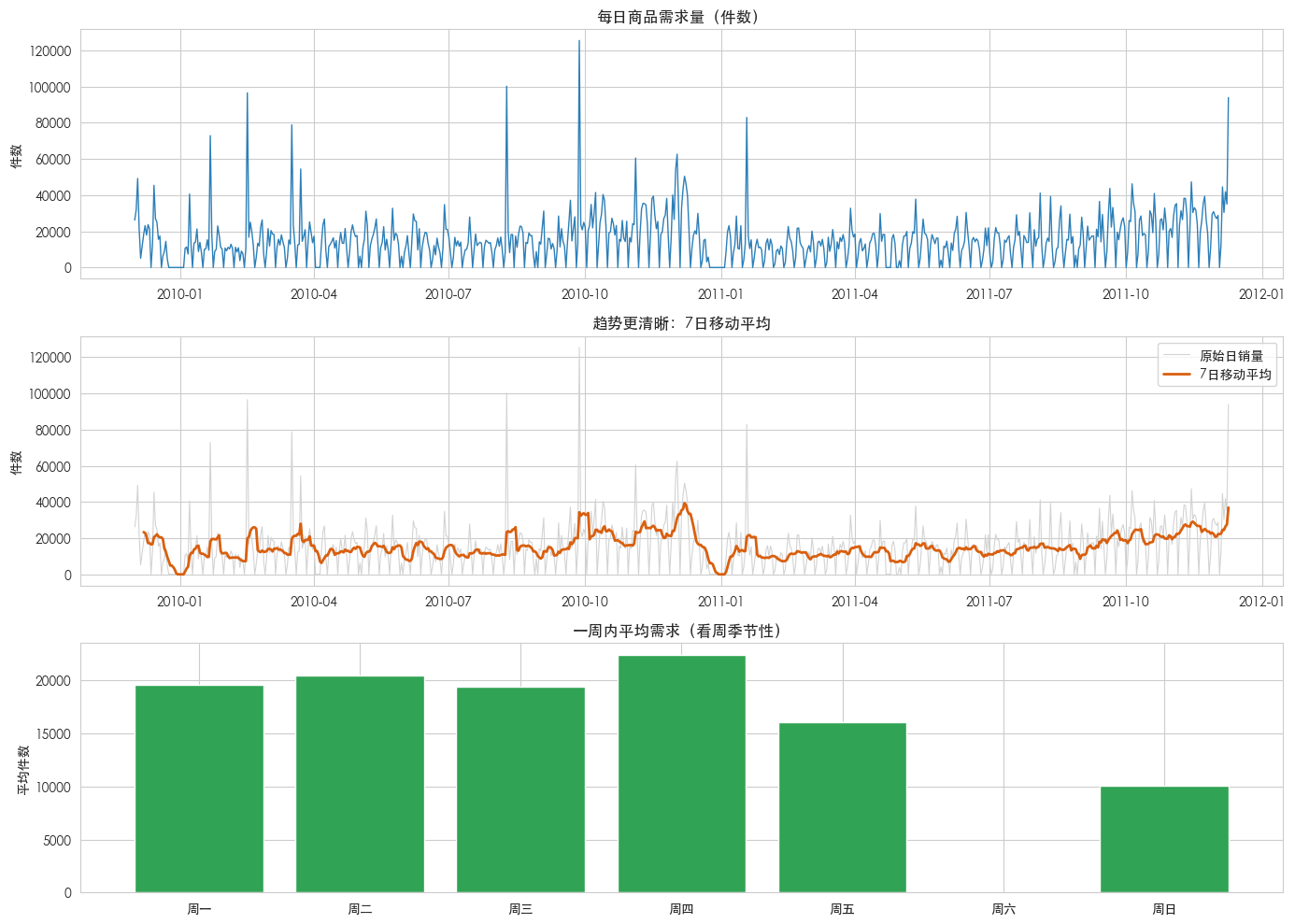
从图里你大概会看到
- 周末销量往往明显更低(这家零售商周末可能几乎不营业或很少出单)
- 年底(圣诞季)需求会冲高
- 日销量波动很大,所以直接用“裸日销量”预测会有噪声
这些都是正常的业务特征,不是“数据坏了”。
# 再看月份季节性
monthly = daily['demand'].resample('M').sum()

plt.figure(figsize=(12, 4))
plt.plot(monthly.index, monthly.values, marker='o', color='#756bb1')
plt.title('每月总需求量')
plt.ylabel('件数')
plt.xlabel('月份')
plt.tight_layout()
plt.show()

print('月度需求描述:')
print(monthly.describe())
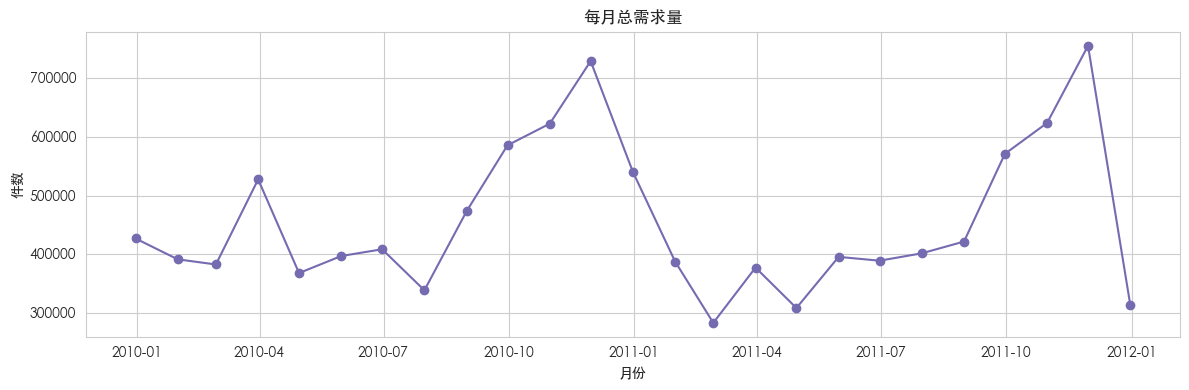
月度需求描述:
count 25.000000
mean 456812.200000
std 128017.774098
min 283555.000000
25% 382781.000000
50% 401759.000000
75% 540198.000000
max 754507.000000
Name: demand, dtype: float64
6. 时间序列分解:趋势 + 季节性 + 噪声
加法分解可以写成:
原始数据 ≈ 趋势 + 季节性 + 噪声日度数据常见的固定周期是 7 天(一周)。
# 为了分解更稳定,这里用 7 日移动平均后的序列也可以;
# 入门案例直接对原始 demand 做 period=7 的分解。
decomp = seasonal_decompose(daily['demand'], model='additive', period=7)

fig = decomp.plot()
fig.set_size_inches(14, 10)
fig.suptitle('时间序列分解(周期=7天)', y=1.02, fontsize=14)
plt.tight_layout()
plt.show()
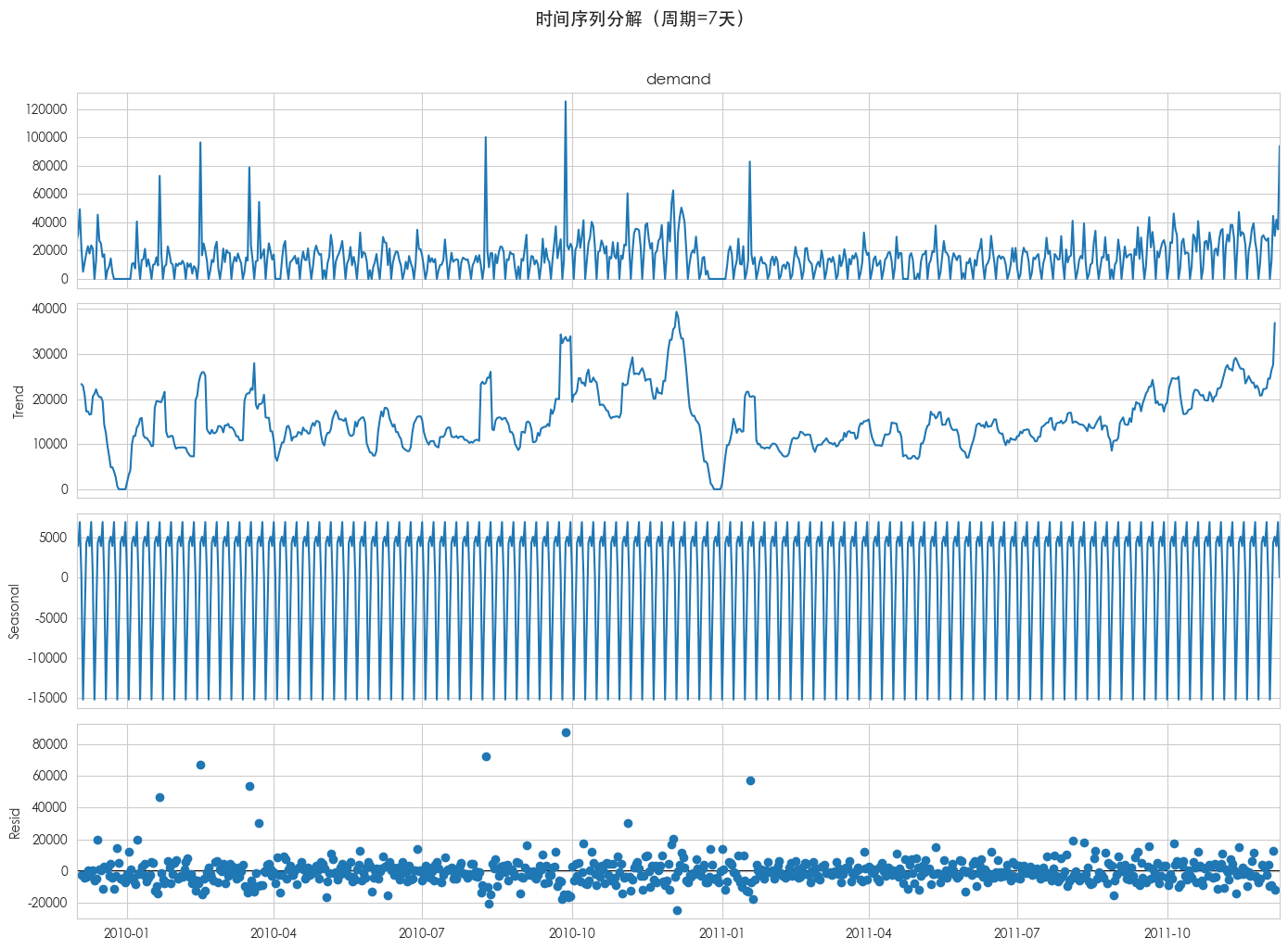
怎么读这四张图?
- Observed:原始销量
- Trend:长期方向(业务在扩张还是收缩)
- Seasonal:每周重复出现的起伏
- Resid:解释不了的随机波动
如果 Seasonal 很明显,后面用 Holt-Winters(带季节项) 就很合理。
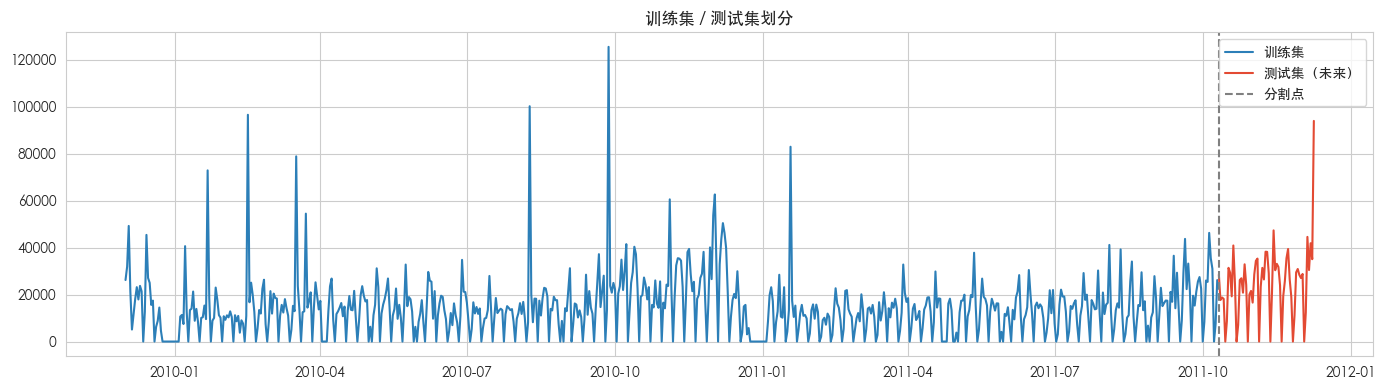
7. 划分训练集和测试集(千万别随机打乱!)
时间序列必须按时间切:
- 训练集:较早的历史
- 测试集:较晚的“假装还没发生的未来”